












Property management software for Saudi Arabia.

Reservations, guests and cleaning, in one system.

Connect the sites you sell on. Suitiee brings their bookings onto one calendar per unit, publishes availability back to your connected channels, messages guests at each stage of the stay, and schedules a cleaning visit by our crews after each checkout — for a single apartment or a managed portfolio.

Free for 14 days · No card needed · Set up in minutes

Operating units for other hosts? Create an operator account

A bright, well-kept short-term rental living room in Riyadh
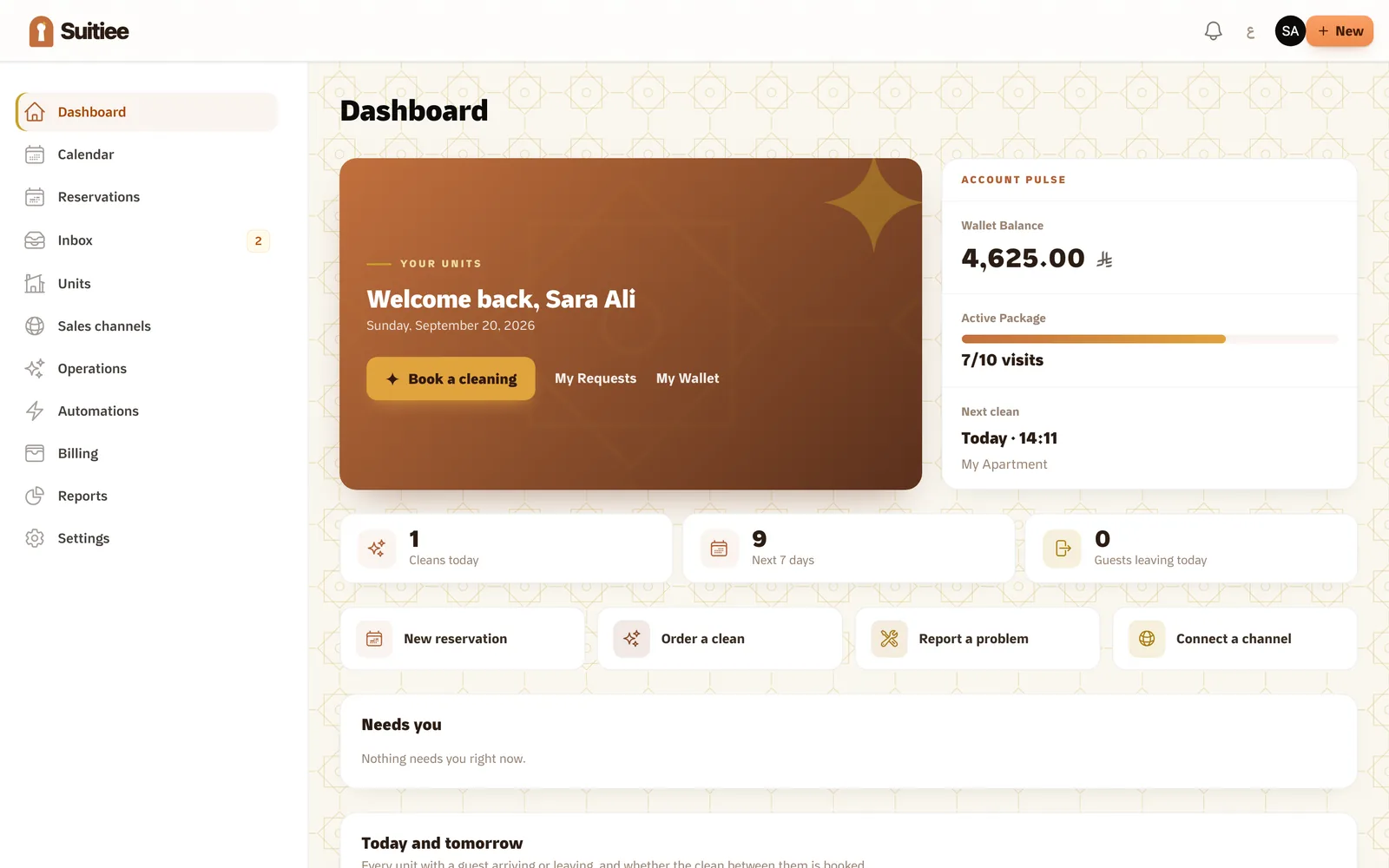
The host dashboard

Suitiee works with the sites you already sell on

  • Gathern
  • Qotoon
  • Airbnb Airbnb
  • Booking.com Booking.com
  • Agoda
  • VRBO
  • Expedia
  • Any ‎.ics calendar

A direct connection for Airbnb · Booking.com; a calendar link for every other site.

A calendar link brings bookings in; a connected channel also receives your prices and availability.

Cleaning

Turnover cleaning, carried out by our crews.

Each confirmed checkout schedules a cleaning visit for our crews, charged per visit to your wallet or prepaid package. The photographs, the checklist and the tax invoice are on the visit record in your account.

  • Scheduled from the checkout, within the window you set
  • Carried out by our crews in your city
  • Photographed before and after
  • A tax invoice for every completed visit
Before the visit After the visit

Ready for the next guest

Double-booking protection.

Four mechanisms keep each unit's availability consistent across the sites it is listed on.

  1. Every source read

    Availability is read from every connected channel and calendar link on a schedule: calendar links every hour, connected channels every few minutes.

  2. Published every minute

    Changed nights are queued and pushed to your connected channels on a one-minute cycle.

  3. A calendar link per unit

    Each unit publishes its own availability link, readable by any site that supports iCal, Gathern included.

  4. Checked every five minutes

    A conflict sweep runs every five minutes, and connected channels are republished in full and read back every night. Two stays on one night are listed under Double booked and counted on your dashboard.

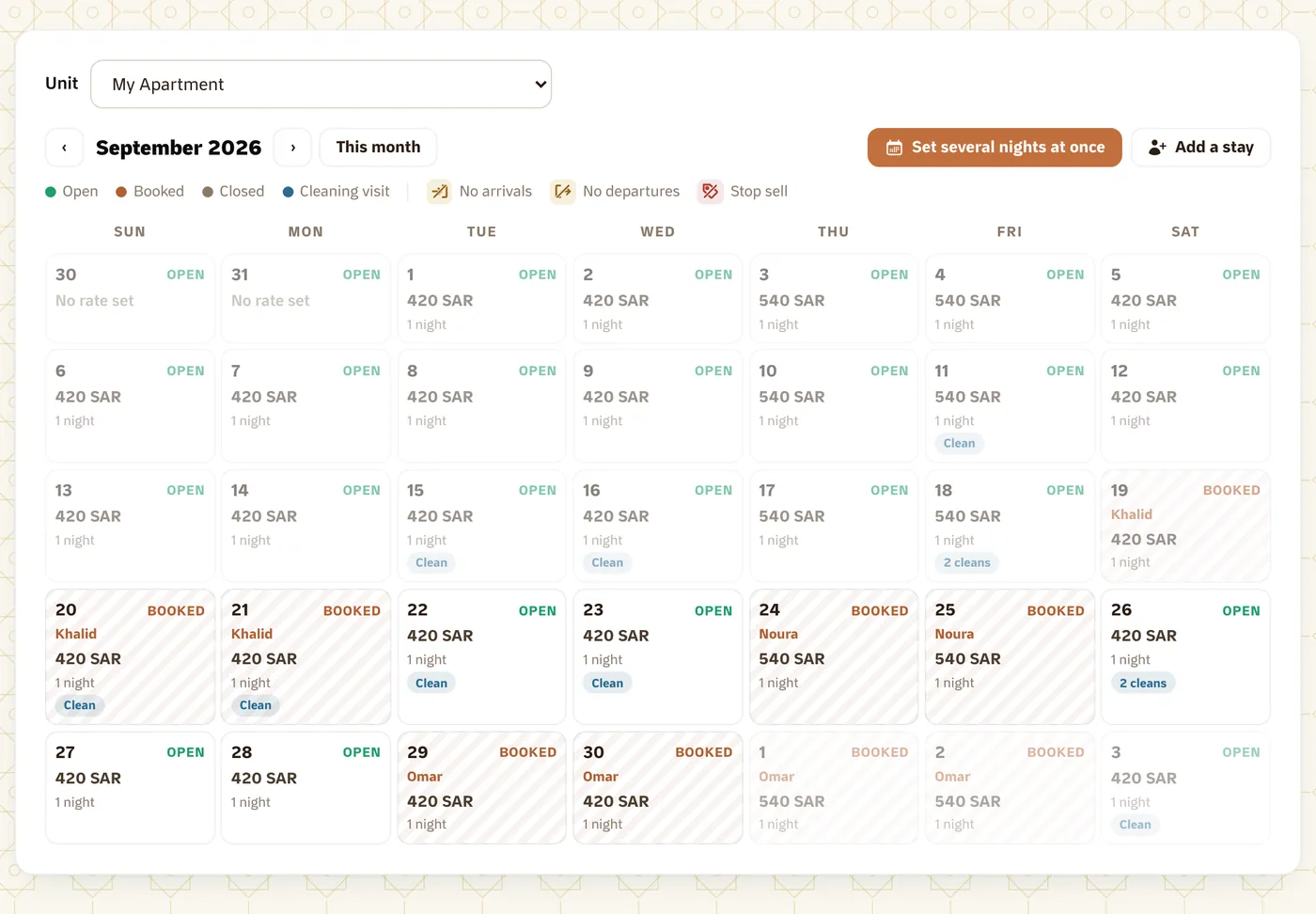
The unit calendar: prices, open nights, guests and cleaning visits, on one grid.

The guest lifecycle, from booking to turnover.

Each stage is timed from the reservation's dates.

  1. 01

    Booking

    The reservation is recorded on the unit calendar, and the guest messages and the turnover are scheduled from its dates.

  2. 02

    Messaging

    Guest messages at set points of the stay, from the confirmation to a thank-you after checkout, each one a template you enable and edit in Arabic and English.

  3. 03

    Check-in

    Check-in details two days before arrival, and the unit's access instructions on the day of arrival.

  4. 04

    Turnover

    The cleaning visit is tracked in your account from dispatch to completion, with the crew's photographs.

A turnover is complete when the crew checks out of the visit with its photographs, not when the guest checks out.

Guest inbox

One inbox for every connected channel.

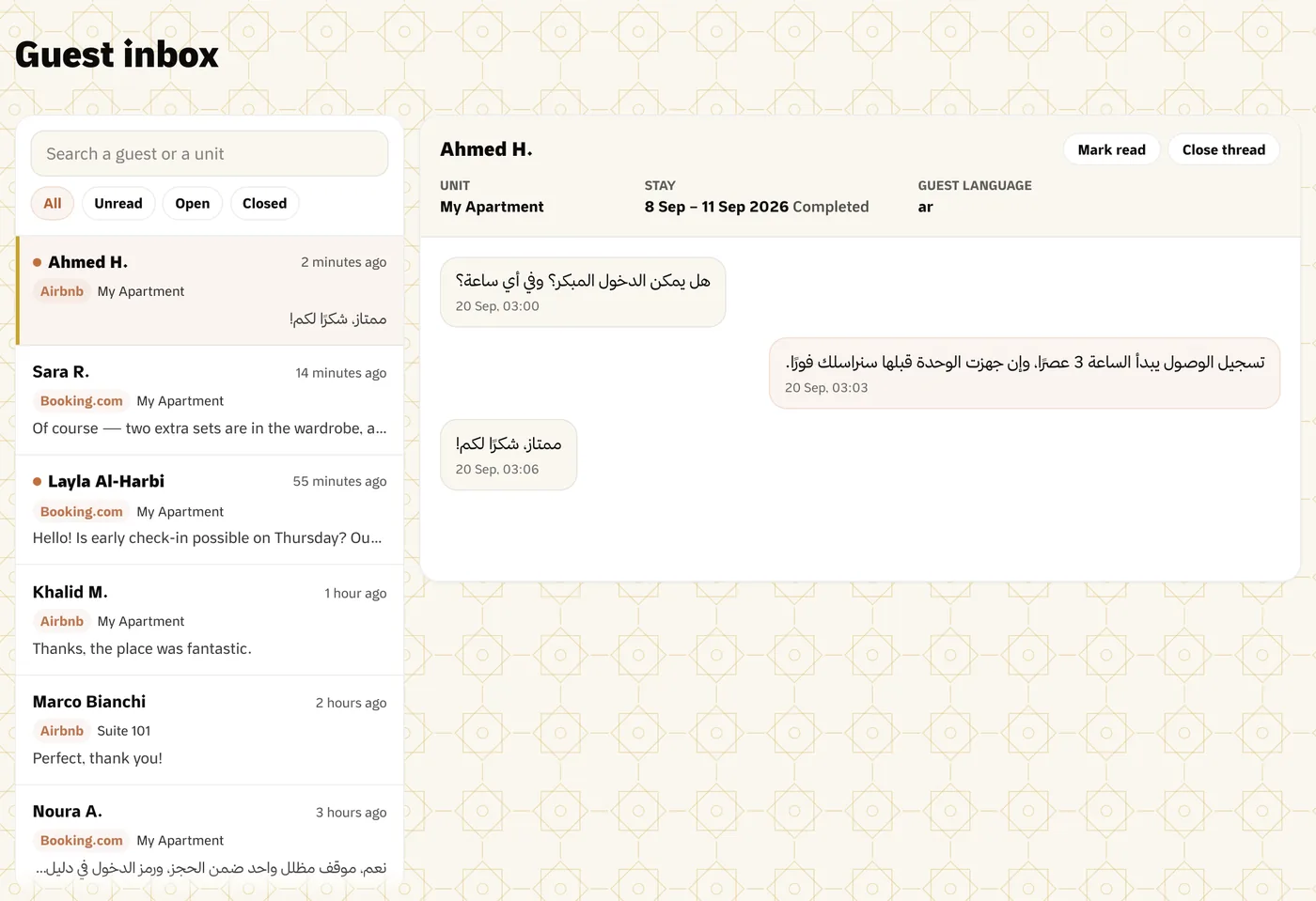
Guest messages from your connected channels and the messages the automations send are kept in one thread per stay, in Arabic or English.

  • Reply from one placeWritten in Suitiee, delivered on the guest's own platform.
  • Your own templatesEvery automated guest message is a template you edit, in Arabic and English; the guest's language selects which is sent.
  • Unread counts and expiring requestsUnread threads are counted on every screen, and a booking request with an expiry time is flagged before it expires.
The guest inbox
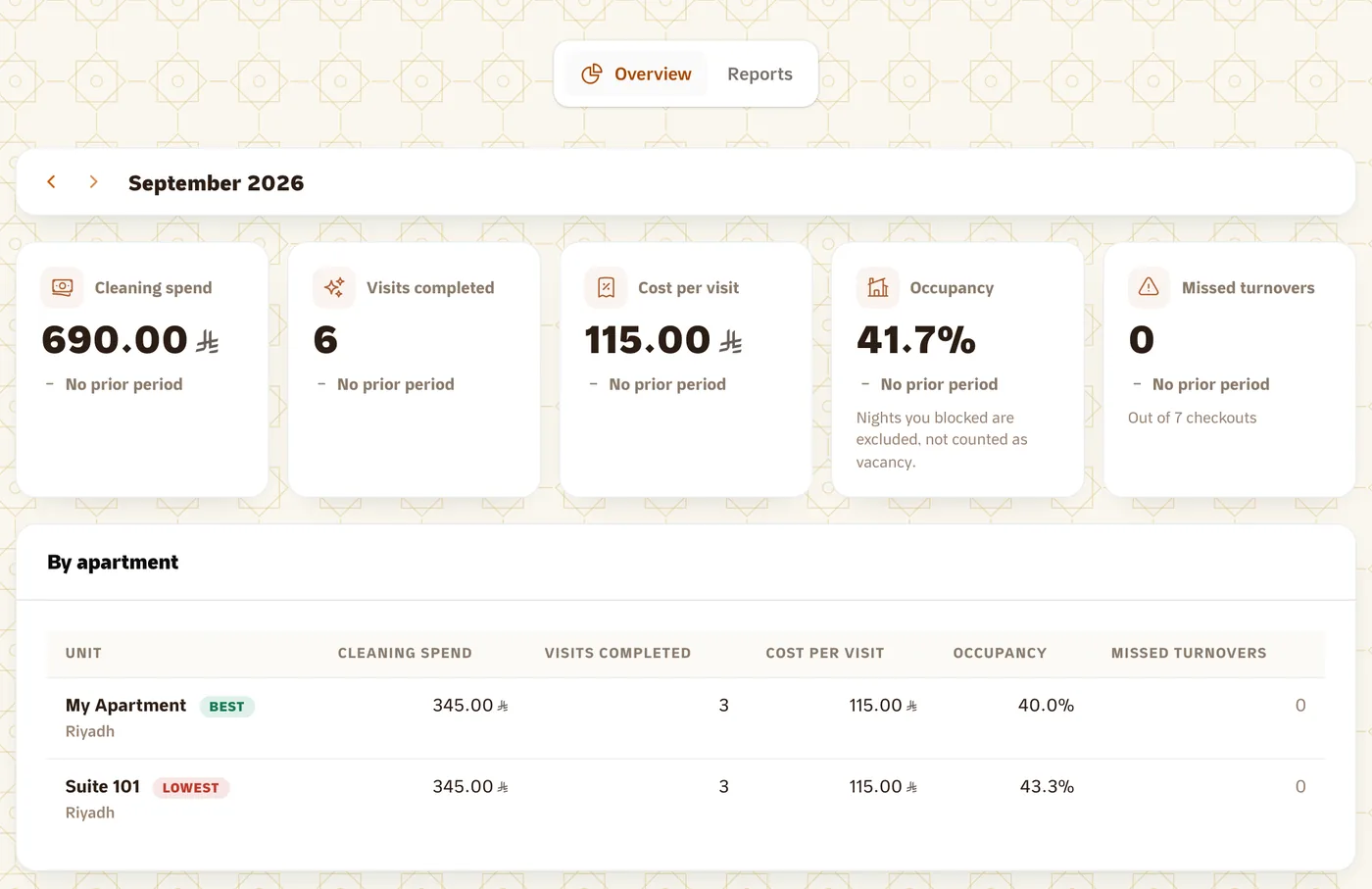
Reports → Overview, one month: cleaning spend, visits, cost per visit, occupancy and missed turnovers per unit.

Reports

Revenue by channel, cleaning cost by unit.

Every booking and cleaning visit is recorded as it is received and reported by channel and by unit: revenue, cleaning spend, cost per visit and missed turnovers, over any period, exportable as CSV.

Every invoice itemises VAT at 15%.

Built for the host and the operator.

Two account types: one for your own units, one for a managed portfolio.

Individual host

You own the units and manage them yourself.

  • A few units from one dashboard
  • Guest inbox for your connected channels
  • Cleaning per visit or by prepaid package
  • Each booking listed with the site it came from

Create a host account

Property operator

You manage many units, or units on behalf of other hosts, from one account.

  • Several hosts under one account
  • Reports across the whole portfolio
  • Monthly owner statements, drafted for your review
  • Checkouts posted from your own PMS, by webhook
Create an operator account

How you start

Three steps to set up.

  1. 1

    Connect your channel

    Sign in to Airbnb, connect Booking.com, or paste a calendar link from Gathern or any other site. Your units are imported with their bookings.

  2. 2

    Check your units

    Confirm the name and address of each imported unit, or add a unit manually if it is not yet listed anywhere.

  3. 3

    Set the cleaning window

    Choose how many hours after checkout each turnover must be completed.

Pricing

One subscription, plus cleaning per visit.

One monthly subscription for the software, plus a per-visit price for each cleaning, shown before you confirm. No percentage of your bookings, and every price includes VAT.

Free for 14 days

150 SAR / month after the trial for the PMS: calendar, channels, inbox, automations and reports. Nothing is charged automatically; you pay one month at a time.

Includes 3 units; 25 SAR a month for each unit above that.

Cleaning from 747.50 SAR a month for a studio package, or per visit.

No card needed to start. Host prices include VAT at 15%.

Safeguards.

Three rules built into the product.

  • Double bookings flagged

    Two stays holding the same night on one unit are listed under Double booked in your reservations, each with the site it was sold on, and counted on your dashboard until one of them is moved or cancelled.

  • Price fixed per visit

    The price of a cleaning visit is set when the visit is created; it is the amount charged and the amount on the tax invoice.

  • Cancellation with notice

    A pending visit can be cancelled at no charge more than 24 hours before its window; the amount returns to the wallet or package it was paid from.

FAQ

Common questions

Do I need a card to start?

No. Create the account, connect a calendar, and the 14-day trial runs with nothing on file. When it ends you pay one month at a time on a secure payment page; nothing is charged automatically.

How are double-bookings handled?

Every source is read on a schedule, sold nights are pushed to your connected channels, and a sweep every five minutes looks for two stays on one night. A conflict is listed under Double booked until one of the stays is moved or cancelled.

Why is cleaning dispatched at checkout rather than at booking?

Because the checkout date can move. The turnover is scheduled from the booking's checkout date and dispatched once the checkout is confirmed, so an extension or a cancellation before then costs nothing.

Who carries out the cleaning?

Our vetted crews, in your city. Each visit is checked in and out on site, photographed before and after, and checked against the unit's checklist; the record is in your account.

Is the price per unit or per account?

One subscription per account, with a set number of units included and a monthly amount for each unit above it; the exact figures are on the pricing page and shown again before you pay. Cleaning is billed per visit or by prepaid package.

Is each unit managed independently?

Yes. Each unit has its own calendar, checklist, access instructions and calendar link, and cleaning cost is reported per unit.

Can I manage units for different owners?

Yes, with an operator account: each host keeps their own units and calendars under it, and you see reports across the portfolio.

How does VAT appear on invoices?

Itemised on every tax invoice at 15%. Host prices in Suitiee include it; operator plans are quoted before VAT, with the tax added on the invoice.

Start with your first channel.

Create an account and connect a channel; your units and their bookings are imported.

Try Suitiee free

Free for 14 days · No card needed · Set up in minutes

Talk to us

Tell us about your units.

We reply within one working day.

Which best describes you?

If a Suitiee team member gave you a code, enter it here.